Basic graph tasks using pargraph#
For more details about pargraph features and APIs, see the pargraph documentation.
Declarative workflow with pargraph#
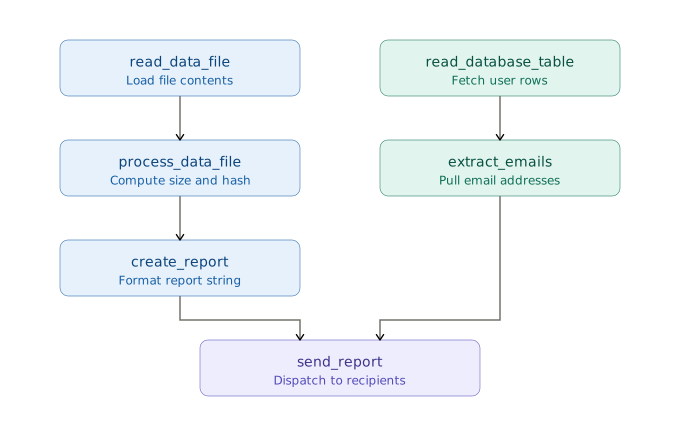
Builds a small declarative graph where independent data-loading steps can run concurrently, then executes the resulting graph through Scaler.
In this graph, two branches can run at the same time because they do not share dependencies:
the file processing branch (
read_data_file->process_data_file->create_report);the reporting branch (
read_database_table->extract_emails).
These branches join in send_report as both branch results are required to send the final report.
import argparse
from typing import List, Tuple

import parfun as pf
import pargraph as pg


@pg.delayed
def read_data_file(filename: str) -> str:
    with open(filename, "r") as f:
        return f.read()


@pg.delayed
def process_data_file(data: str) -> str:
    data_size = len(data.encode("utf-8"))
    data_hash = hash(data)

    return f"<size={data_size} bytes, hash={data_hash}>"


@pg.delayed
def create_report(filename: str, processed_data: str) -> str:
    return f"File report for {filename} is {processed_data}"


@pg.delayed
def read_database_table(table_name: str) -> List[Tuple[str, str]]:
    return [("alice", "alice@example.com"), ("bob", "bob@example.com")]


@pg.delayed
def extract_emails(table_content: List[Tuple[str, str]]) -> List[str]:
    return [email for _, email in table_content]


@pg.delayed
def send_report(report: str, email_list: List[str]) -> int:
    for email in email_list:
        print(f"Dummy send email to {email} with content: {report}")

    return len(email_list)


@pg.graph
def generate_and_send_report(filename: str, user_table: str) -> int:
    data = read_data_file(filename)

    processed_data = process_data_file(data)

    report = create_report(filename, processed_data)

    users = read_database_table(user_table)
    email_list = extract_emails(users)

    n_emails = send_report(report, email_list)

    return n_emails


def run_graph(filename: str):
    graph_engine = pg.GraphEngine()

    # Generate the graph computation
    graph, keys = generate_and_send_report.to_graph().to_dict(filename=filename, user_table="users")

    # Runs the graph computation in parallel, computing all nodes
    return graph_engine.get(graph, keys)[0]


if __name__ == "__main__":
    parser = argparse.ArgumentParser()
    parser.add_argument("filename", nargs="?", default=__file__)
    parser.add_argument("--scaler-address", dest="scaler_address", default=None)
    args = parser.parse_args()

    if args.scaler_address:
        # Connects to a remote Scaler Cluster
        with pf.set_parallel_backend_context("scaler_remote", args.scaler_address):
            n_emails = run_graph(args.filename)
    else:
        # Creates a temporary local Scaler cluster
        with pf.set_parallel_backend_context("scaler_local"):
            n_emails = run_graph(args.filename)

    print(f"Generated and sent report to {n_emails} email(s)")
To run the example with a remote scheduler, connecting to a running Scaler cluster:
python examples/libraries/generate_report.py --scaler-address tcp://127.0.0.1:8516