Introduction
Architecture
Below is a diagram of the relationship between multiple Clients, the Scheduler, Worker Managers, and Workers.
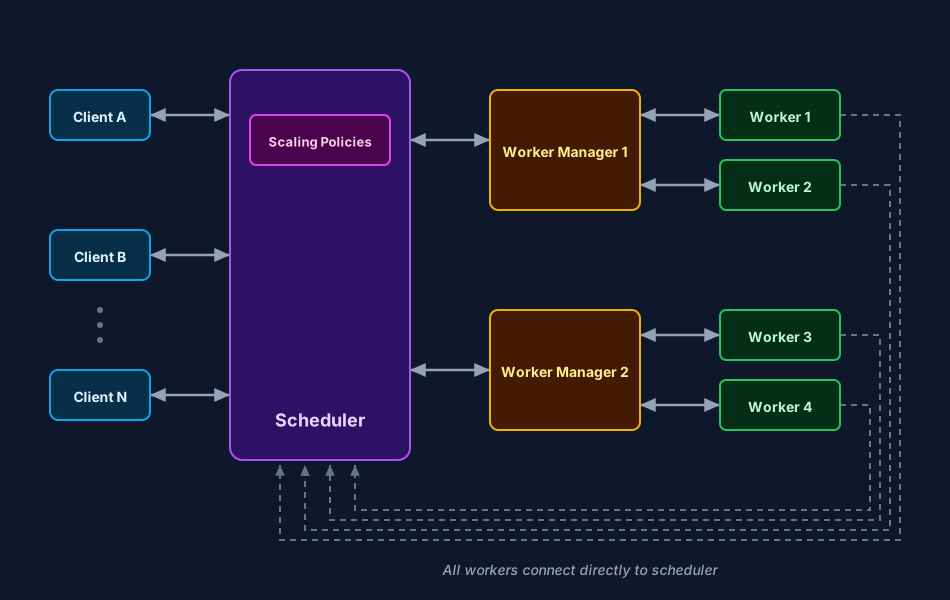
Multiple clients can submit tasks to the same scheduler concurrently.
The client is responsible for serializing tasks and arguments.
Multiple worker managers can connect to the same scheduler and provision capacity in parallel.
Worker managers spawn workers, and workers connect directly to the scheduler.
The scheduler dispatches tasks to connected workers, and workers execute tasks and return results.
Installation
The opengris-scaler package is available on PyPI and can be installed using any compatible package manager.
Base installation:
pip install opengris-scaler
If you need the web GUI:
pip install opengris-scaler[gui]
If you use GraphBLAS to solve DAG graph tasks:
pip install opengris-scaler[graphblas]
If you need all optional dependencies:
pip install opengris-scaler[all]
Key Features
Cross cloud computing support with unified and single client api
Easy spawn clusters on either local machine or clouds
Python
multiprocessing-style client API, for exampleclient.map()client.starmap()andclient.submit().Graph tasks for DAG-based execution with explicit dependencies use
client.get().Both CLI and WebUI Monitoring dashboard for real-time worker and task visibility.
Task profiling for runtime and resource diagnostics.
For code API examples and client patterns, see Scaler Client.
Spinning up Scheduler and Cluster Separately
The object storage server, scheduler and workers can be spun up independently through the CLI. Here we use localhost addresses for demonstration, however the scheduler and workers can be started on different machines.
scaler_object_storage_server tcp://127.0.0.1:8517
scaler_scheduler tcp://127.0.0.1:8516 -osa tcp://127.0.0.1:8517
[INFO]2025-06-06 13:30:05+0200: logging to ('/dev/stdout',)
[INFO]2025-06-06 13:30:05+0200: use event loop: builtin
[INFO]2025-06-06 13:30:05+0200: Scheduler: listen to scheduler address tcp://127.0.0.1:8516
[INFO]2025-06-06 13:30:05+0200: Scheduler: connect to object storage server tcp://127.0.0.1:8517
[INFO]2025-06-06 13:30:05+0200: Scheduler: listen to scheduler monitor address tcp://127.0.0.1:8518
scaler_cluster -n 10 tcp://127.0.0.1:8516
From here, connect the Python Client and begin submitting tasks:
from scaler import Client


def square(value):
    return value * value


with Client(address="tcp://127.0.0.1:8516") as client:
    results = client.map(square, range(0, 100))

print(results)